Conceptualising a Point of Sale (POS) Module for Omniful.ai
Product Design
Product Design
Professional Project
Professional Project


Omniful is an E-Commerce startup providing software solutions for Order Management (OMS), Warehouse Management (WMS) & Transport Management (TMS).
Omniful is an E-Commerce startup providing software solutions for Order Management (OMS), Warehouse Management (WMS) & Transport Management (TMS).
Omniful is an E-Commerce startup providing software solutions for Order Management (OMS), Warehouse Management (WMS) & Transport Management (TMS).
What is a POS (Point of Sale)?
What is a POS (Point of Sale)?
What is a POS (Point of Sale)?
A Point of Sale (POS) system is a combination of hardware and software that businesses use to process customer transactions, manage inventory, and track sales data.
A Point of Sale (POS) system is a combination of hardware and software that businesses use to process customer transactions, manage inventory, and track sales data.
A Point of Sale (POS) system is a combination of hardware and software that businesses use to process customer transactions, manage inventory, and track sales data.
A modern POS system typically takes care of
• Payment processing
• Customer purchase history & profile records
• Customer relationship Management-
Loyalty programs, Memberships
• Sales data records
• Integration with Multiple sales & marketing channels
• Employee management
• Inventory Management
• Digital tips*
A modern POS system typically takes care of
• Payment processing
• Customer purchase history & profile records
• Customer relationship Management-
Loyalty programs, Memberships
• Sales data records
• Integration with Multiple sales & marketing channels
• Employee management
• Inventory Management
• Digital tips*
A modern POS system typically takes care of
• Payment processing
• Customer purchase history & profile records
• Customer relationship Management-
Loyalty programs, Memberships
• Sales data records
• Integration with Multiple sales & marketing channels
• Employee management
• Inventory Management
• Digital tips*

Devices which are used for POS software
Devices which are used for POS software
Devices which are used for POS software
Cash Register
Cash Register
Cash Register
Desktop
Desktop
Desktop
All in one PC (with touch)
All in one PC (with touch)
All in one PC (with touch)
mPOS (Handheld)
mPOS (Handheld)
mPOS (Handheld)
Self Service /Checkout
Self Service /Checkout
Self Service /Checkout
Contactless (Scan & Order)
Contactless (Scan & Order)
Contactless (Scan & Order)
Online
Online
Online
Who are the Users?
Who are the Users?
Who are the Users?
There are two types of users. Cashier and Admin. Admin type can have manager and admin subtypes.
There are two types of users. Cashier and Admin. Admin type can have manager and admin subtypes.
There are two types of users. Cashier and Admin. Admin type can have manager and admin subtypes.
Competitors
Competitors
Competitors
User Flow
User Flow
User Flow
High Fidelity Screens
High Fidelity Screens
High Fidelity Screens
Mockups
Mockups
Mockups
Omniful POS eventually led to 30% faster transaction speeds, 15% increase in sales through cross-sell & upsell, and an inventory accuracy of 99%.
Omniful POS eventually led to 30% faster transaction speeds, 15% increase in sales through cross-sell & upsell, and an inventory accuracy of 99%.
Omniful POS eventually led to 30% faster transaction speeds, 15% increase in sales through cross-sell & upsell, and an inventory accuracy of 99%.
For further information, please visit the following link.
https://docs.omniful.ai/partners/omniful-product-pos-module.pdf
My Role
My Role
My Role
I was given the task to conceptualize a point of sale module, based on market and competitor research using Omniful’s design system.
I was given the task to conceptualize a point of sale module, based on market and competitor research using Omniful’s design system.
I was given the task to conceptualize a point of sale module, based on market and competitor research using Omniful’s design system.
Duration- 2 Weeks
Duration- 2 Weeks
Duration- 2 Weeks
The POS requirement for Omniful was as a Module with their package of OMS(Order Management System) and WMS (Warehouse management systems).
Which meant the software needed only the POS register and Cash management submodules.
The POS requirement for Omniful was as a Module with their package of OMS(Order Management System) and WMS (Warehouse management systems).
Which meant the software needed only the POS register and Cash management submodules.
The POS requirement for Omniful was as a Module with their package of OMS(Order Management System) and WMS (Warehouse management systems).
Which meant the software needed only the POS register and Cash management submodules.
The requirement for Cashier/Manager roles demands adaptable interface for touch and web application, With Multi device support.
The Admin roles mostly needs Web application for the remaining business operations, data visualisation.
The requirement for Cashier/Manager roles demands adaptable interface for touch and web application, With Multi device support.
The Admin roles mostly needs Web application for the remaining business operations, data visualisation.
The requirement for Cashier/Manager roles demands adaptable interface for touch and web application, With Multi device support.
The Admin roles mostly needs Web application for the remaining business operations, data visualisation.
Omniful’s available systems minimise the role POS has to play, as Order management & Inventory management are taken care of.
So, the requirement for the platform becomes that of a adaptable POS for multiple devices with a starting point for a CRM system (Customer Relationship Management), which can be upgraded as the needs evolve.
That staring point is the ability to add customer data & offer personalised discounts on the go.
Omniful’s available systems minimise the role POS has to play, as Order management & Inventory management are taken care of.
So, the requirement for the platform becomes that of a adaptable POS for multiple devices with a starting point for a CRM system (Customer Relationship Management), which can be upgraded as the needs evolve.
That staring point is the ability to add customer data & offer personalised discounts on the go.
Omniful’s available systems minimise the role POS has to play, as Order management & Inventory management are taken care of.
So, the requirement for the platform becomes that of a adaptable POS for multiple devices with a starting point for a CRM system (Customer Relationship Management), which can be upgraded as the needs evolve.
That staring point is the ability to add customer data & offer personalised discounts on the go.
Cashier is the primary end user in most POS applications. He/She processes customer transactions and ensures smooth checkout operations.
Cashier is the primary end user in most POS applications. He/She processes customer transactions and ensures smooth checkout operations.
Cashier is the primary end user in most POS applications. He/She processes customer transactions and ensures smooth checkout operations.
Objectives
Objectives
Objectives
Complete transactions efficiently
Customer Satisfaction
Complete transactions efficiently
Customer Satisfaction
Complete transactions efficiently
Customer Satisfaction
Permissions
Permissions
Permissions
Add Discounts
Add Customers
Print Labels
Sell & Return Sell
Cash Movements
Inventory Counts
Register Open/close
PO & Stock transfer*
Add Discounts
Add Customers
Print Labels
Sell & Return Sell
Cash Movements
Inventory Counts
Register Open/close
PO & Stock transfer*
Add Discounts
Add Customers
Print Labels
Sell & Return Sell
Cash Movements
Inventory Counts
Register Open/close
PO & Stock transfer*

Cashier/Sales Associate
Cashier/Sales Associate
Cashier/Sales Associate
Non Management Sales Staff
Non Management Sales Staff
Non Management Sales Staff
The Management staff oversees store operations, staff performance, and approvals for special transactions.
The Management staff oversees store operations, staff performance, and approvals for special transactions.
The Management staff oversees store operations, staff performance, and approvals for special transactions.
Objectives
Objectives
Objectives
Manage & monitor Sales Staff
Manage Inventory & Stock
Manage & Monitor cash
Manage & monitor Sales Staff
Manage Inventory & Stock
Manage & Monitor cash
Manage & monitor Sales Staff
Manage Inventory & Stock
Manage & Monitor cash
Permissions
Permissions
Permissions
All of Cashier’s
Add & edit Cashiers
View payment reports
View product costs
View sales History (assigned locations)
Export and edit customers, Bulk input
Create & edit promotions, prices
Adjust inventory (manually)
Remove products
All of Cashier’s
Add & edit Cashiers
View payment reports
View product costs
View sales History (assigned locations)
Export and edit customers, Bulk input
Create & edit promotions, prices
Adjust inventory (manually)
Remove products
All of Cashier’s
Add & edit Cashiers
View payment reports
View product costs
View sales History (assigned locations)
Export and edit customers, Bulk input
Create & edit promotions, prices
Adjust inventory (manually)
Remove products

Manager
Manager
Manager
Management Staff
Management Staff
Management Staff

The Administrative role configures and controls the POS system, user access, and business-wide reporting.
The Administrative role configures and controls the POS system, user access, and business-wide reporting.
The Administrative role configures and controls the POS system, user access, and business-wide reporting.
Objectives
Objectives
Objectives
Monitor all stores in Operation
Assign permissions & roles to Managerial staff
Monitor all stores in Operation
Assign permissions & roles to Managerial staff
Monitor all stores in Operation
Assign permissions & roles to Managerial staff
Permissions
Permissions
Permissions
All of Manager’s
Add & edit managers
Manage loyalty, taxes, and payment methods
View reports across outlets
All of Manager’s
Add & edit managers
Manage loyalty, taxes, and payment methods
View reports across outlets
All of Manager’s
Add & edit managers
Manage loyalty, taxes, and payment methods
View reports across outlets
Admin
Admin
Admin
Owner or Head office
Owner or Head office
Owner or Head office
Touch Guidelines
Touch Guidelines
Touch Guidelines
Material 3 & Apple Human Interface Guidelines provide guides for accessibility in case of touch controlled devices.
Material 3 & Apple Human Interface Guidelines provide guides for accessibility in case of touch controlled devices.
Material 3 & Apple Human Interface Guidelines provide guides for accessibility in case of touch controlled devices.
Apple Human Interface Guidelines
Apple Human Interface Guidelines
Apple Human Interface Guidelines
Material 3’s target guidelines
Material 3’s target guidelines
Material 3’s target guidelines
For most platforms, consider making touch targets at least 48 x 48dp. A touch target this size results in a physical size of about 9mm, regardless of screen size. The recommended target size for touchscreen elements is 7-10mm. It may be appropriate to use larger touch targets to accommodate a larger spectrum of users.
For most platforms, consider making touch targets at least 48 x 48dp. A touch target this size results in a physical size of about 9mm, regardless of screen size. The recommended target size for touchscreen elements is 7-10mm. It may be appropriate to use larger touch targets to accommodate a larger spectrum of users.
For most platforms, consider making touch targets at least 48 x 48dp. A touch target this size results in a physical size of about 9mm, regardless of screen size. The recommended target size for touchscreen elements is 7-10mm. It may be appropriate to use larger touch targets to accommodate a larger spectrum of users.
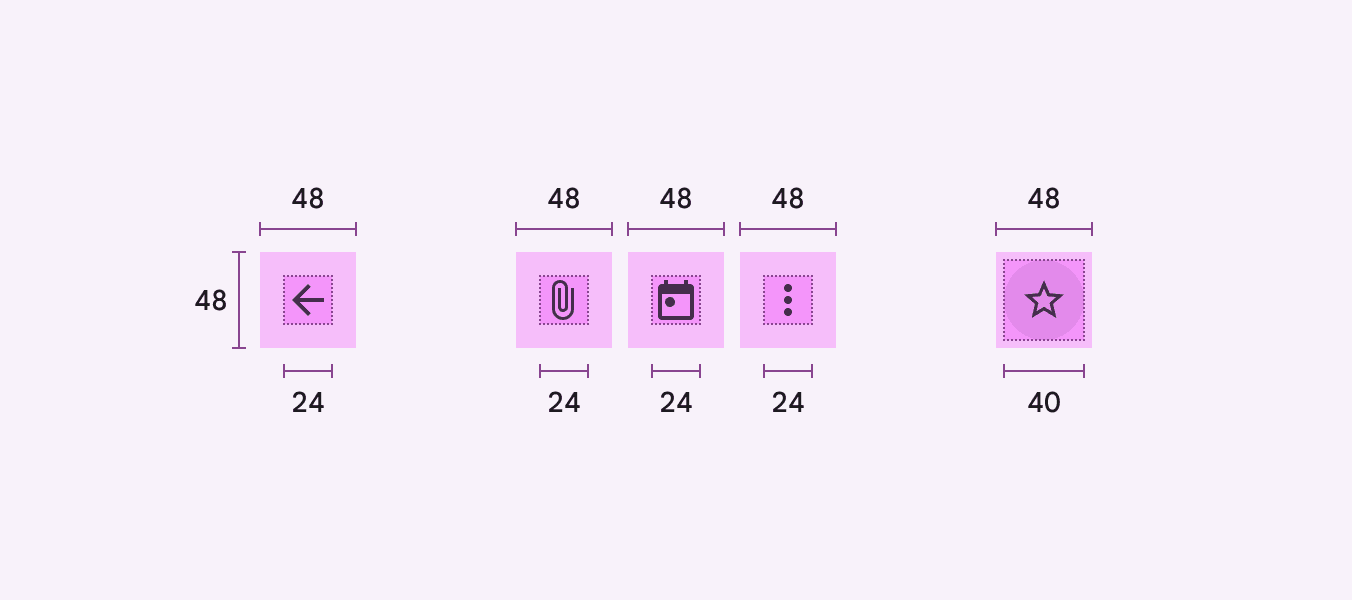
In most cases, targets separated by 8dp of space or more promote balanced information density and usability.
In most cases, targets separated by 8dp of space or more promote balanced information density and usability.
In most cases, targets separated by 8dp of space or more promote balanced information density and usability.

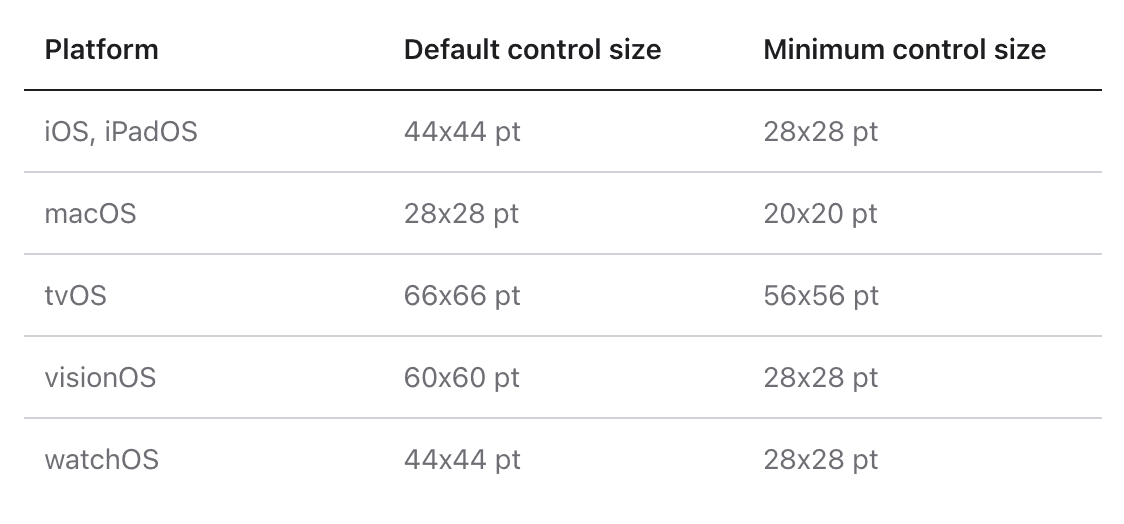
Strive to meet the recommended minimum control size for each platform to ensure controls and menus are comfortable for all when tapping and clicking.
Strive to meet the recommended minimum control size for each platform to ensure controls and menus are comfortable for all when tapping and clicking.
Strive to meet the recommended minimum control size for each platform to ensure controls and menus are comfortable for all when tapping and clicking.
Rewaa POS
Rewaa POS
Rewaa POS
Shopify POS
Shopify POS
Shopify POS
Lightspeed Retail POS
Lightspeed Retail POS
Lightspeed Retail POS
Rewaa is the primary competitor in UAE, where Omniful has their base clients.
Rewaa is the primary competitor in UAE, where Omniful has their base clients.
Rewaa is the primary competitor in UAE, where Omniful has their base clients.
Features
Features
Features
Interconnected functions
Expenses & Promotions app for customisation
Multiple payment options simplified
Product customisations- fields
Interconnected functions
Expenses & Promotions app for customisation
Multiple payment options simplified
Product customisations- fields
Interconnected functions
Expenses & Promotions app for customisation
Multiple payment options simplified
Product customisations- fields
Cons
Cons
Cons
Design Language Inconsistency, Intermix of touch and click
Design Language Inconsistency, Intermix of touch and click
Design Language Inconsistency, Intermix of touch and click
Shopify is a global leader in e-commerce platform, and offers a POS as part of the package.
Shopify is a global leader in e-commerce platform, and offers a POS as part of the package.
Shopify is a global leader in e-commerce platform, and offers a POS as part of the package.
Features
Features
Features
Customer facing Display Mode
Sell on Website, In store & Online, Socials & digital Marketplaces
Marketing apps integration
Discounts customisation
Third party apps integrations
Customisations in Receipts, UI, Emails, etc
Customer profiles and segmented data
Customer facing Display Mode
Sell on Website, In store & Online, Socials & digital Marketplaces
Marketing apps integration
Discounts customisation
Third party apps integrations
Customisations in Receipts, UI, Emails, etc
Customer profiles and segmented data
Customer facing Display Mode
Sell on Website, In store & Online, Socials & digital Marketplaces
Marketing apps integration
Discounts customisation
Third party apps integrations
Customisations in Receipts, UI, Emails, etc
Customer profiles and segmented data
Cons
Cons
Cons
App for Mobile & Tab only
No offline mode
App for Mobile & Tab only
No offline mode
App for Mobile & Tab only
No offline mode
Lightspeed POS too, works globally & focusses on systems for offline stores.
Lightspeed POS too, works globally & focusses on systems for offline stores.
Lightspeed POS too, works globally & focusses on systems for offline stores.
Features
Features
Features
Touch Optimised Sale Screen- Macro buttons for every possible step
Simplified Multi mode payments
Discounts, gift cards, credits, account payments, Loyalty for CRM
Better customer management (individual & group)
Integrated payments
Loyalty Marketing
Web store, Social media stores In platform
Touch Optimised Sale Screen- Macro buttons for every possible step
Simplified Multi mode payments
Discounts, gift cards, credits, account payments, Loyalty for CRM
Better customer management (individual & group)
Integrated payments
Loyalty Marketing
Web store, Social media stores In platform
Touch Optimised Sale Screen- Macro buttons for every possible step
Simplified Multi mode payments
Discounts, gift cards, credits, account payments, Loyalty for CRM
Better customer management (individual & group)
Integrated payments
Loyalty Marketing
Web store, Social media stores In platform
Cons
Cons
Cons
Inventory Management not upto standards for a large size firm
Inventory Management not upto standards for a large size firm
Inventory Management not upto standards for a large size firm


Pages
Pages
Pages
User Flow (Cashier)
User Flow (Cashier)
User Flow (Cashier)
Omniful Homepage
Omniful Homepage
Omniful Homepage
POS tab
POS tab
POS tab
Registers
Registers
Registers
Registers
Registers
Registers
Opening Count
Opening Count
Opening Count
Closing Count
Closing Count
Closing Count
Register Home
Register Home
Register Home
Sell Screen (Default)
Sell Screen (Default)
Sell Screen (Default)
Invoices
Invoices
Invoices
Invoice Details
Invoice Details
Invoice Details
Pay Screen
Pay Screen
Pay Screen
Register Home
Register Home
Register Home
Sell Screen
Sell Screen
Sell Screen
Invoices
Invoices
Invoices
Cash Management
Cash Management
Cash Management
Settings
Settings
Settings
Manager Access
Manager Access
Manager Access
Print Sale Receipt
Print Sale Receipt
Print Sale Receipt
Close Register
Close Register
Close Register
Return Items
Return Items
Return Items
Print Receipt
Print Receipt
Print Receipt
Print Receipt
Print Receipt
Print Receipt
Open Register
Open Register
Open Register
Search & Add Items
Search & Add Items
Search & Add Items
Add/Withdraw Cash
Add/Withdraw Cash
Add/Withdraw Cash
Add Items to return
Add Items to return
Add Items to return
Pause Sale
Pause Sale
Pause Sale
Cancel/Delete Sale
Cancel/Delete Sale
Cancel/Delete Sale
Add Customer
Add Customer
Add Customer
*Details have been left out because of the NDA.
*Details have been left out because of the NDA.
*Details have been left out because of the NDA.
Add Discount
Add Discount
Add Discount
Add Promotions
Add Promotions
Add Promotions
Pay
Pay
Pay
Pay with Cash
Pay with Cash
Pay with Cash
Credit Pay
Credit Pay
Credit Pay
Post Pay
Post Pay
Post Pay
Multi Pay
Multi Pay
Multi Pay
Login with Credentials
Login with Credentials
Login with Credentials
Cashier Access
Cashier Access
Cashier Access
Note
Note
Note
The following are a glimpse of the outcome.
Please contact for more details.
The following are a glimpse of the outcome.
Please contact for more details.
The following are a glimpse of the outcome.
Please contact for more details.


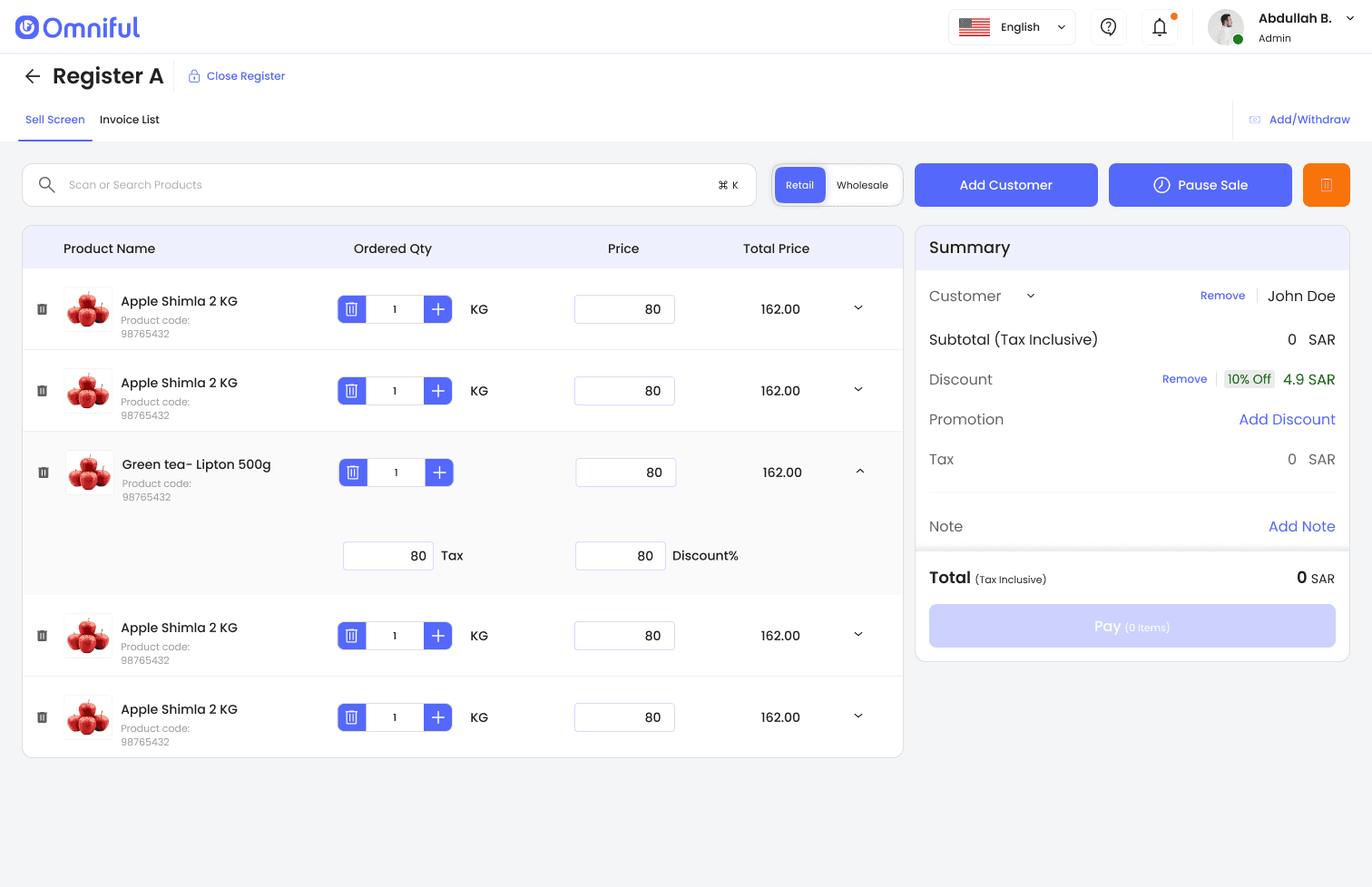


Register Home & Select Register
Register Home & Select Register
Register Home & Select Register
Cash Management
Cash Management
Cash Management
Invoices & Payment
Invoices & Payment
Invoices & Payment